Predictive UX: Designing Websites that Anticipate the Next Click
(1) Question: What is Predictive User Experience?
Answer: Using AI to anticipate a user’s needs and change the website interface before they even click.
(2) Question: How does the AI know what the user wants?
Answer: By analyzing micro-behaviors like mouse hover patterns, scroll speed, and entry source in milliseconds.
(3) Question: Can Predictive UX change a website’s navigation?
Answer: Yes, it can move the most relevant menu items or buttons to the top for that specific user.
(4) Question: What is the main benefit of PUX?
Answer: It reduces “cognitive load,” making it effortless for the user to find what they need and complete a purchase. Would you like me to format these into a downloadable PDF guide or a specific social media carousel layout for your brand?
The best websites no longer wait for visitors to decide what they want. They predict it. Using artificial intelligence, websites can now adjust their layout, content, and navigation in real time, based on each visitor’s behaviour, intent, and context.
This approach is called predictive UX (user experience), where data and design work together to anticipate user needs and guide them toward the next logical step before they even take it.
For small businesses, this shift represents a massive opportunity. Instead of hoping visitors find what they need, your site can adapt dynamically, showing the right product, service, or message at exactly the right moment.
When your website feels one step ahead, visitors feel understood, and that’s what turns browsing into buying.
Let’s explore how predictive UX works and how small businesses can start designing websites that think ahead.
Understanding Predictive UX and AI-Powered Website Design

Predictive UX uses artificial intelligence, behavioural data, and machine learning to understand user intent. It’s like having a digital shop assistant who recognises what a customer wants based on subtle cues, their clicks, scrolls, time on page, and even how they move their mouse.
Rather than showing everyone the same static layout, an AI-powered website can adjust in real time: rearranging menus, changing recommendations, or surfacing specific calls-to-action (CTAs) that best fit the visitor’s journey.
For example:
A returning customer might see recently viewed products at the top of the homepage.
A new visitor might see a simple explainer or welcome video.
A visitor showing signs of hesitation could see reassurance messages like “Free returns” or “No sign-up required.”
Someone scrolling through pricing pages might automatically see an offer or demo prompt.
Predictive UX blends technology and empathy. It’s not about pushing sales, it’s about removing friction and helping people find what they came for faster.
Websites that anticipate intent feel smoother, smarter, and more human.
Why Predictive User Experience Improves Engagement and Conversions
Traditional web design treats every visitor the same. Predictive UX, on the other hand, tailors the experience for each person, increasing engagement and boosting conversions.
When a website understands intent, users spend less time searching and more time interacting. It creates a sense of flow, where every click feels natural, and every page seems designed just for them.
Here’s how predictive UX helps small businesses:
Fewer drop-offs: Users don’t get stuck or lost in irrelevant pages.
Higher engagement: Content adjusts to match visitor interest instantly.
Increased trust: Personalised recommendations feel intuitive, not forced.
Better conversions: Anticipating needs reduces hesitation and uncertainty.
Smarter insights: AI learns continuously from user behaviour to refine design.
Predictive UX doesn’t just improve what visitors see; it improves how they feel while using your site. That emotional satisfaction keeps them coming back and telling others about their experience.
When every click feels effortless, conversion becomes a natural next step.
How AI Predicts User Intent in Web Design
AI prediction models analyse behavioural data in real time to guess what a user might want next. These models use pattern recognition from previous visits and broader user trends to anticipate actions before they happen.

For example, an AI might track:
Pages viewed and time spent on each.
Mouse movements, scroll depth, and hover patterns.
Device type, location, or referral source.
Common paths taken by similar users.
Once it has enough context, the system makes micro-adjustments to improve user flow. It might:
Rearrange elements on the page.
Suggest relevant blog posts, services, or products.
Show tailored CTAs like “Book a free demo” instead of “Learn more.”
Change visuals or headlines based on user preferences.
This level of adaptability turns websites into living systems that evolve as users interact. Predictive UX is essentially AI-guided design in motion, where every visit helps make the next one better.
Implementing Predictive UX in Small Business Websites
Predictive UX might sound advanced, but many affordable tools already offer versions of it. You don’t need a full development team, just a plan to start collecting and using visitor data responsibly.
Here’s how small businesses can get started:
Use analytics tools like Google Analytics 4 or Hotjar to track visitor behaviour.
Adopt AI-driven website builders (such as Wix ADI, HubSpot Smart Content, or Framer AI) that adapt layout automatically.
Create audience segments based on intent (e.g., new visitors, repeat customers, or high-intent buyers).
Add dynamic content blocks that change based on visitor type or time of day.
Run A/B tests using AI tools that learn which layouts perform best over time.
Personalise messaging using behavioural triggers in chatbots or email follow-ups.
Start small, for instance, by testing personalised CTAs or adjusting homepage sections for different visitor types. As you gather data, your system becomes more accurate and predictive.
The goal isn’t to overwhelm users with constant change. It’s to quietly guide them with content that always feels one step ahead.
The Future of Predictive Website Design and AI-Driven UX
In the near future, websites won’t just respond to clicks, they’ll predict them. AI systems will use emotional and contextual cues to sense what visitors might be feeling or needing next.

Imagine:
A travel website adjusts imagery based on the weather in the visitor’s location.
An online shop changes tone and recommendations based on browsing speed.
A business website shifting its layout for different buyer personas in real time.
These experiences will be subtle yet powerful, creating a sense that every site “just gets you.”
As predictive UX becomes standard, static websites will start to feel outdated. Visitors will expect personalised, responsive experiences that adapt intuitively, the same way streaming services recommend shows or apps adjust to your habits.
For small businesses, adopting predictive design early means offering a more modern, customer-first experience that builds loyalty and a competitive edge.
The most successful websites of tomorrow won’t just inform, they’ll anticipate, guide, and connect.
Final Thoughts
User expectations have shifted from navigation to anticipation. Visitors no longer want to be guided step by step. They expect the interface to understand intent, reduce effort, and surface the next relevant action before friction appears. Static menus, linear funnels, and guesswork-based layouts struggle to keep up with behaviour that changes in real time. The advantage now belongs to websites designed around prediction, not reaction.
We help UK small businesses implement predictive UX systems:
Behaviour-aware interfaces that adapt as users move
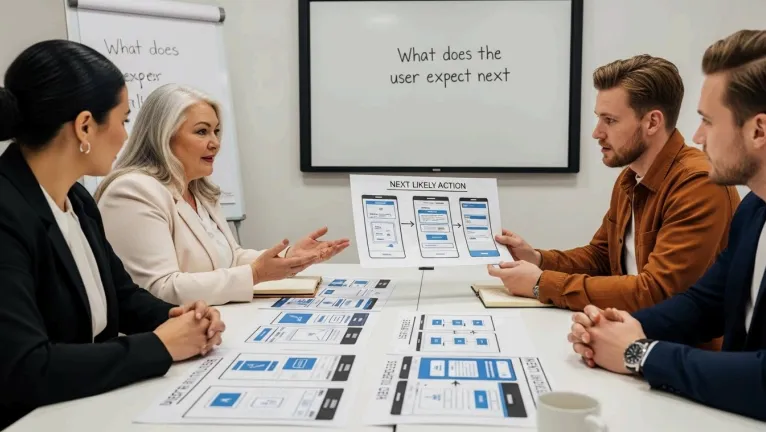
AI-driven content blocks that surface the next likely action
Intelligent routing that reduces clicks and dead ends
Automated optimisation based on real interaction patterns
Schedule your free AI marketing audit. We review how your current website responds to user behaviour, identify where predictive UX can reduce friction and improve conversion, and show which AI tools enable experiences that feel intuitive without being intrusive.
Let’s talk.
The "Trust Tax" and the Battle Against AI Slop
🚀 Want more high-impact guides like this? Stay tuned for next week’s edition where we dive further into the [topic]. Subscribe now and stay on top of the automation world.